
Grok Imagine: What a Month of Real Use Actually Taught Me
xAI’s image and video generator is genuinely impressive at some things and genuinely broken at others. The line between them is more interesting than the benchmarks suggest.
Elon Musk has been promoting Grok Imagine on X almost daily. Posts showing AI-generated images, video clips, announcements about new features. Barely a week goes by without him calling it the most capable image generator available. When the founder of the company is personally running the hype account, you either take the product seriously or you dismiss it as marketing. I decided to test it properly instead.
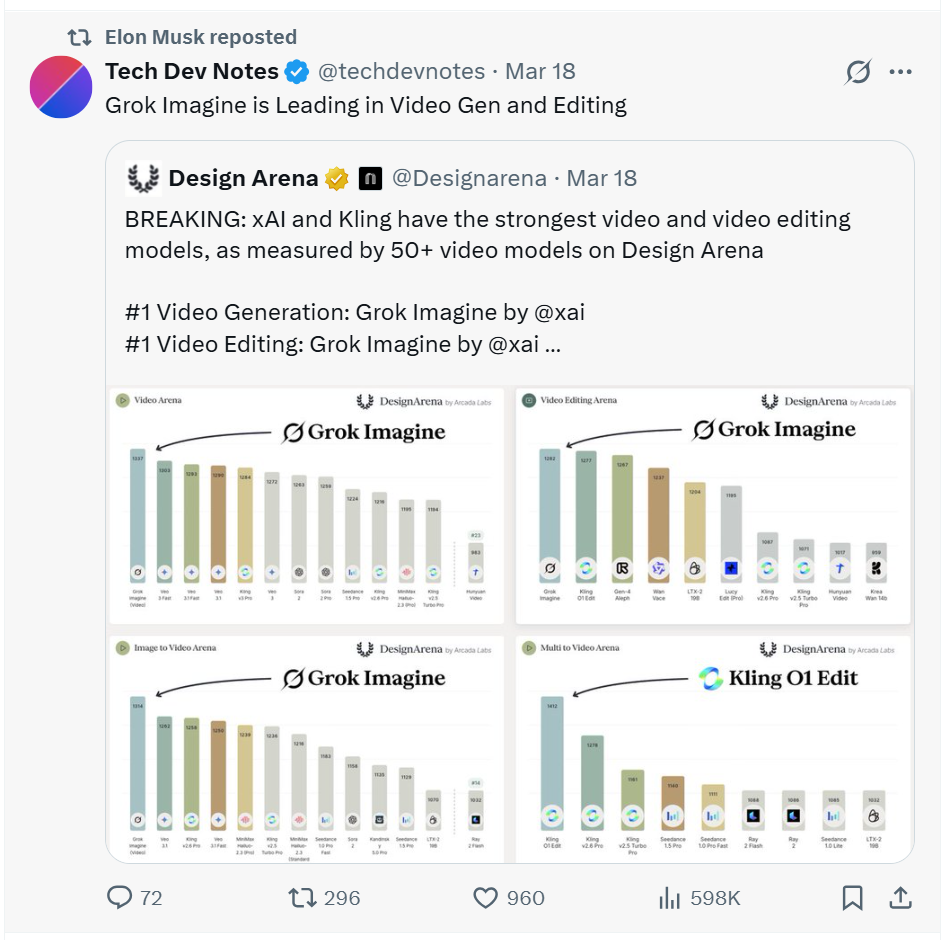
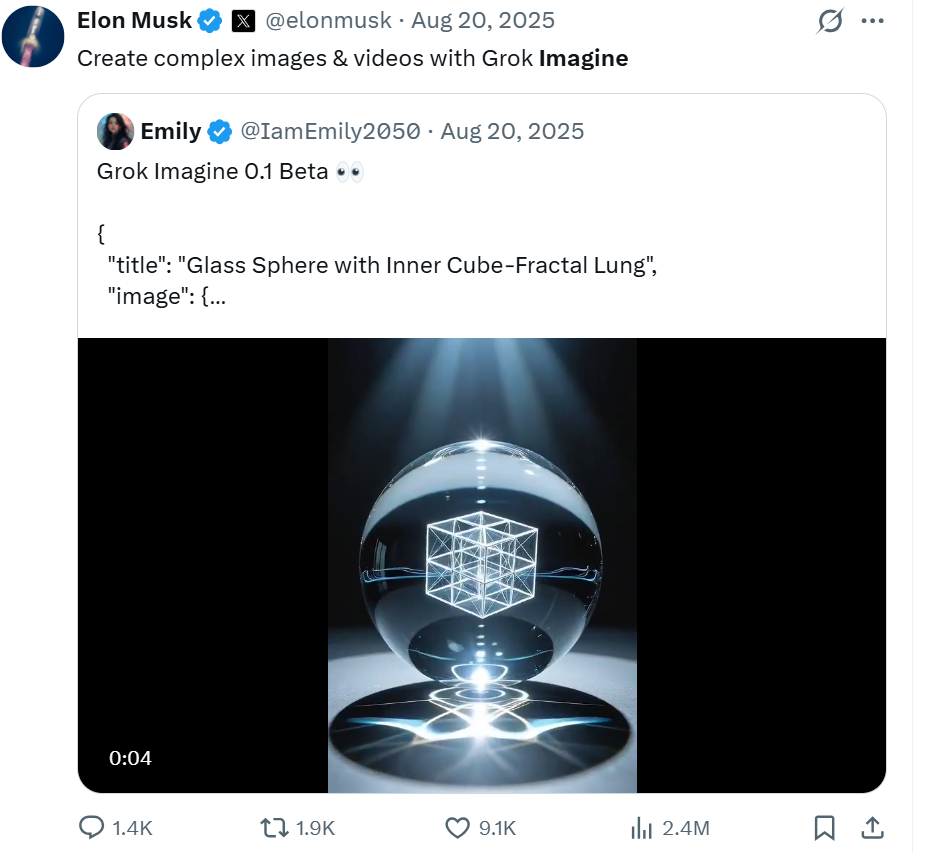
Elon Musk promoting Grok Imagine on X. This is a regular occurrence. Source: X
xAI built Grok Imagine with one stated goal: make image generation feel less like prompting a machine and more like directing a shoot. When it launched in late 2024 and upgraded through 2025 into its current form, the pitch was photorealism fast enough to keep up with how content creators actually think. I spent the last month running it hard on SuperGrok for real social media work: thumbnail concepts, scene visuals, short video clips for various projects. Not as a controlled test. As actual production use.
The short version is this: Grok Imagine is one of the better tools for certain things, and genuinely poor at others. The line between those two categories tells you something real about how these image models work, and that something is more interesting than any benchmark comparison.
“Grok Imagine runs on Aurora, xAI’s proprietary engine. Its autoregressive architecture processes image generation sequentially, often resulting in more coherent and contextually accurate outputs.”
xAI, Aurora engine documentationContextually accurate, yes. But context in Grok Imagine’s world means visual context. The physics of the real world is a different kind of context entirely, and that gap is the most important thing to understand before you hand it a production brief.
What Grok Imagine Gets Right
Grok Imagine’s strongest territory is anything that doesn’t require understanding cause and effect. Landscapes, textures, architectural surfaces, atmospheric lighting, objects in isolation, environments with no humans in them. The model has clearly absorbed an enormous volume of photographic data and can reproduce the qualities of professional photography with genuine precision. You ask for a cinematic wide shot of a desert plain at golden hour and what comes back looks like it was taken by a camera crew.
The speed is not a gimmick. Midjourney at its fastest is 30 to 60 seconds, and while it now has a web interface, its workflow is still built around Discord at its core. Grok Imagine returns results in under 10 seconds through a clean web interface. For anyone generating thumbnail concepts late at night, iterating through five directions before choosing one, that difference in friction matters more than it sounds. You stay in the thinking. You don’t break your flow waiting for a render. This alone puts it ahead of tools with better peak output but slower cycles.
Within a session, style consistency holds well. Establish a visual tone in your first prompt and subsequent generations stay close to it. For thumbnail work where visuals need to look coherent across a series, this matters. It is not perfect. Pushed across very different prompts it drifts. But it holds better than DALL-E 3 in my experience and sits in the same range as Midjourney without any of Midjourney’s parameter syntax overhead.
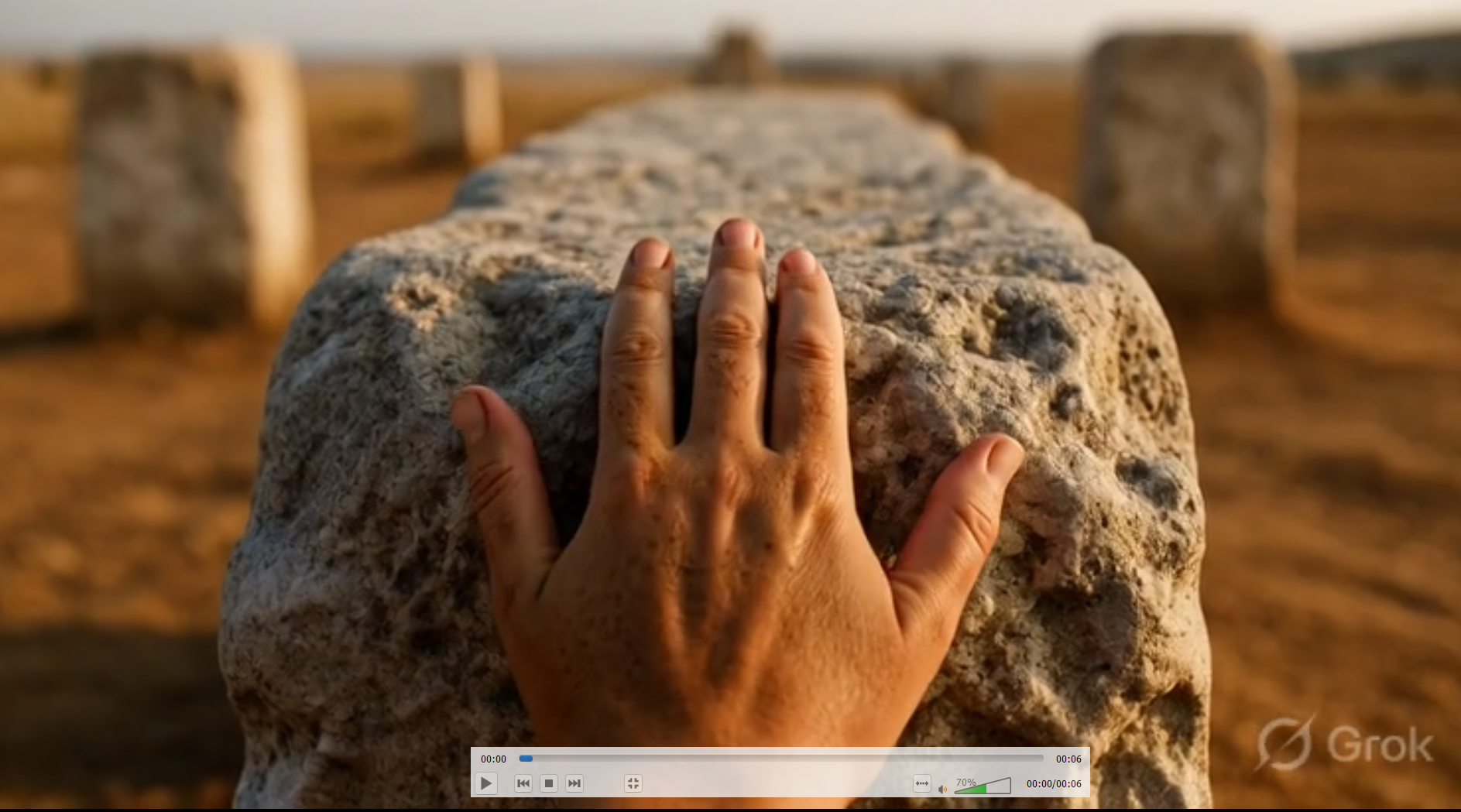
A frame from a Grok Imagine video generation. The atmosphere is right. The hand is not. Source: Grok / xAI
Look at that frame. The lighting is cinematic, the stone texture is detailed, the depth of field is exactly what a professional photographer would pull. Then look at the hand. Count from the thumb side. There are, depending on how you parse the anatomy, two thumbs. Grok Imagine rendered beautiful skin texture, perfect directional light, and a hand that cannot exist in any human body. Nobody testing this in a controlled benchmark would catch it. In a YouTube thumbnail, a viewer’s eye finds it in two seconds.
The Video Mode
Grok Imagine supports both text-to-video and image-to-video in the same interface. You can prompt directly to a video clip without touching the image mode at all, or you can generate an image first and then animate it. Clips come out at 6 or 10 seconds, at 480p or 720p. The image-to-video route gives you more control over composition and character consistency since your reference image anchors the output. The text-to-video route is faster for testing rough ideas. Both produce audio natively, which remains one of the tool’s genuine differentiators.
For a short video on compulsive phone use, I prompted: “3 AM. You’re still scrolling. One more reel. One more post. Why can’t you stop.” What came back was a close shot of a young man’s face lit blue by a screen in a dark room. Genuinely uncomfortable to look at. The face, the light, the expression: all exactly right. The motion in the clip is slow and correct. That part earned its place. I’ll come back to what didn’t.
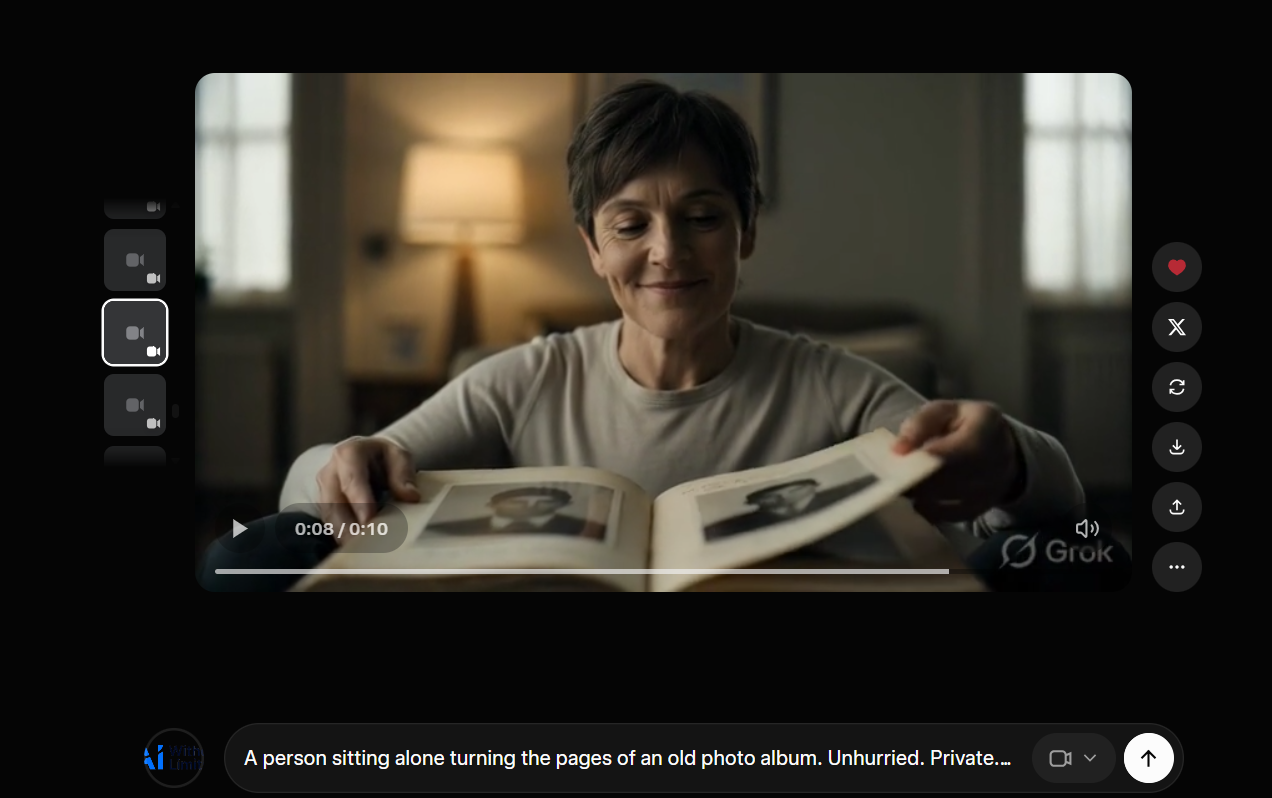
Cinematic, well-lit, emotionally correct. But look at the photos in the album. They’re facing away from her. Source: Grok / xAI
This one is also cinematic. Warm lamp, quiet room, a woman turning the pages of an old photo album. The motion is smooth. The feeling is there. But look at the photographs in the album. They are printed upside down relative to the woman looking at them. She is turning the pages of a book where all the photographs face away from her. Grok Imagine understood “woman looking at photo album in warm evening light” with precision. It did not understand that a reader and the book they hold share the same up.
One thing that genuinely surprised me: the audio. For atmospheric clips with no dialogue, the sound Grok Imagine generates is not an afterthought. It matches the emotional tone of the visual with real accuracy. The psychology channel video had the right ambient texture behind it without any additional audio work. This is a meaningful differentiator because standalone image generators simply do not have this, and adding audio to short-form content is a workflow step that kills time faster than anything else in a production pipeline.
The Physics Wall
After a month of testing, the failure mode is consistent enough that you can predict it before you generate. Grok Imagine fails whenever the prompt requires understanding how a physical process actually unfolds. Not how something looks, but how it works. The model can tell you what a javelin throw looks like. It cannot tell you what a javelin throw is.
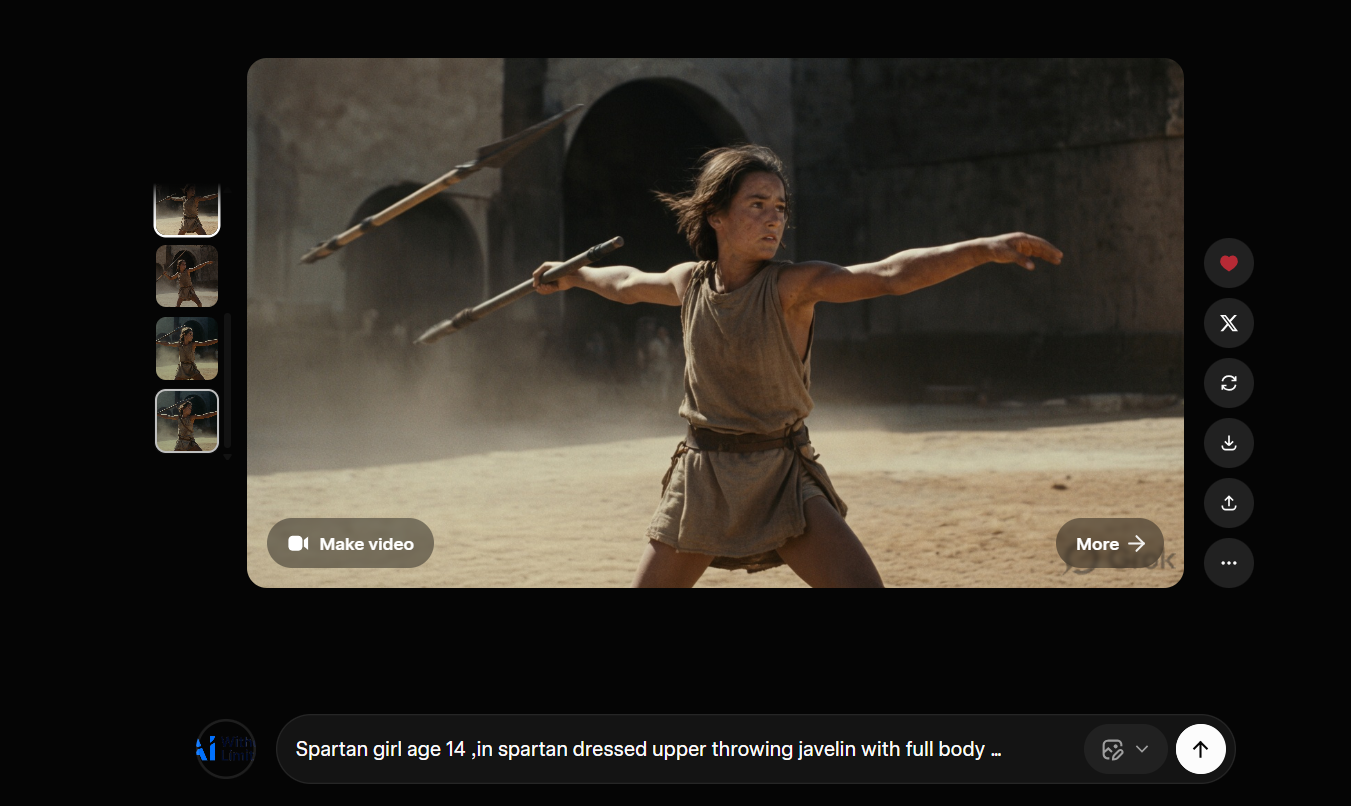
The handle is in the hand. The shaft is floating disconnected somewhere else in the frame. Source: Grok / xAI
Look at the javelin. The handle sits correctly in the warrior’s throwing hand. The shaft and tip are floating elsewhere in the frame, disconnected, as if the weapon passed through itself mid-throw. The pose is cinematic, the dust and light are exactly right, and the object the entire image is built around does not physically hold together. Grok Imagine learned what a throwing pose looks like. It did not learn that a javelin is a single continuous object whose two ends stay attached to each other.
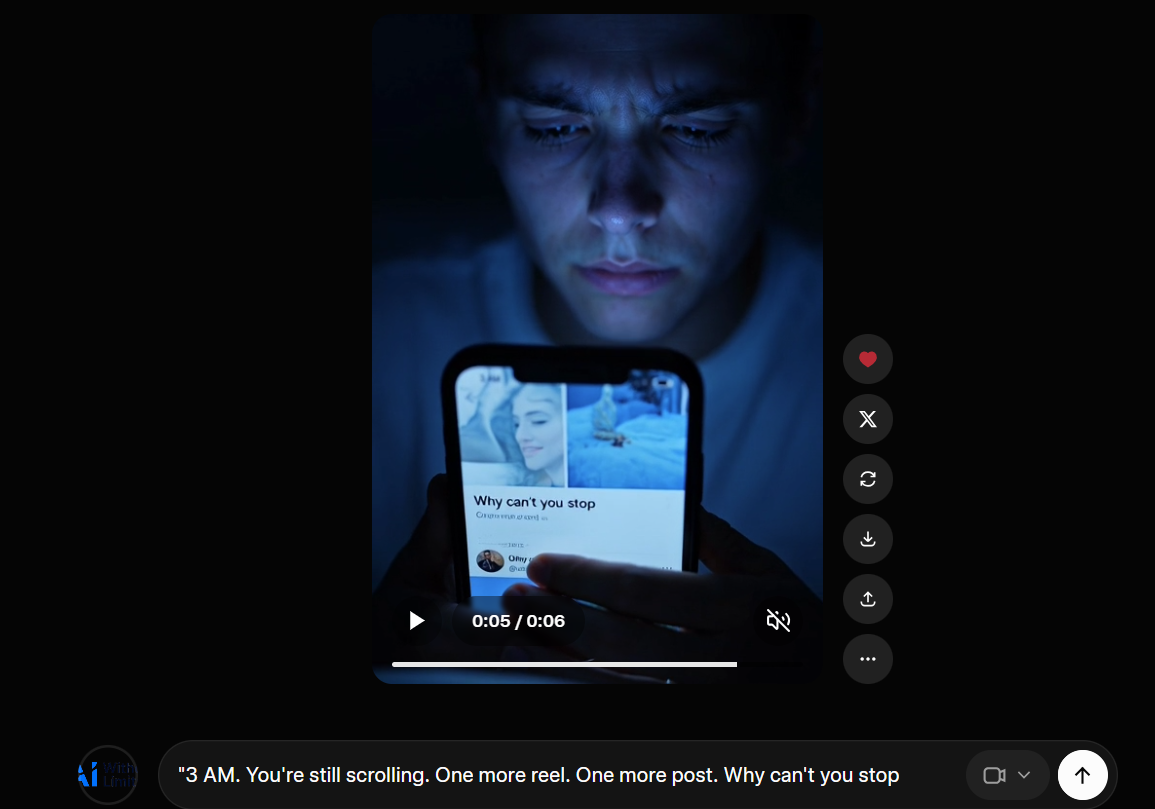
The face is right. The feeling is right. The screen is facing the camera, not the person holding the phone. Prompt: “3 AM. You’re still scrolling. One more reel. One more post. Why can’t you stop.” Source: Grok / xAI
Back to the 3AM clip. This is the same error in a different frame. Grok Imagine nailed the emotional register of that prompt. The face, the cold blue light, the expression of someone who knows they should stop and isn’t stopping. All of that lands. But look at the phone. The screen faces the camera. The person in the video is holding a phone whose display is turned entirely away from their own eyes. Grok Imagine understood “person staring at phone at 3am” as a visual composition to match, not as a spatial relationship between a user and a device. In the real world, you look at the screen. The screen does not look at the audience.
The photo album has the same problem: the photographs in the album face away from the woman turning its pages. A hand generated for a historical scene has two thumbs. A horse bends in a direction no spine bends. These are not random failures. They are the same failure wearing different clothes. Grok Imagine predicts what something looks like to a viewer, not how it functions from the inside.
The model is predicting the most visually plausible image for the prompt, and visually plausible is not the same as physically correct. Grok Imagine learned from photographs. Photographs are frozen moments, not processes. They carry no information about what happened before the shutter clicked or what the body is about to do next. Teaching a model to understand physical causality from static images is a fundamentally different problem from teaching it to match visual patterns, and it remains unsolved across all major image generators, not just this one. The honest position is that this is not a bug that gets patched. It is a limitation of the training paradigm.
The Core DistinctionGrok Imagine knows what things look like. It does not know how things work. That single distinction will sort almost every result you get from it into the right bucket before you generate. It will also save you from publishing a thumbnail where the hero’s hand has two thumbs.
The Reference Feature: Seven Images, One Problem
On March 12, 2026, xAI added something genuinely useful to Grok Imagine: the ability to reference up to seven uploaded images in a single generation using the @ symbol, with each image assigned a role in the output. The idea is character consistency across multiple frames. You upload a face, a costume, a background, a style reference, and the model holds all of them in place while generating. For content creators building thumbnails across a series, this is the kind of feature that changes what the tool can do.
I used it to build a science thumbnail, specifically building toward a “Project Hail Mary” visual concept. The reference compositing works. It can hold a real microscopy image alongside a generated environment and produce something that looks like intentional art direction rather than a random generation. When the inputs are visual and the instruction is compositional, the results are strong.
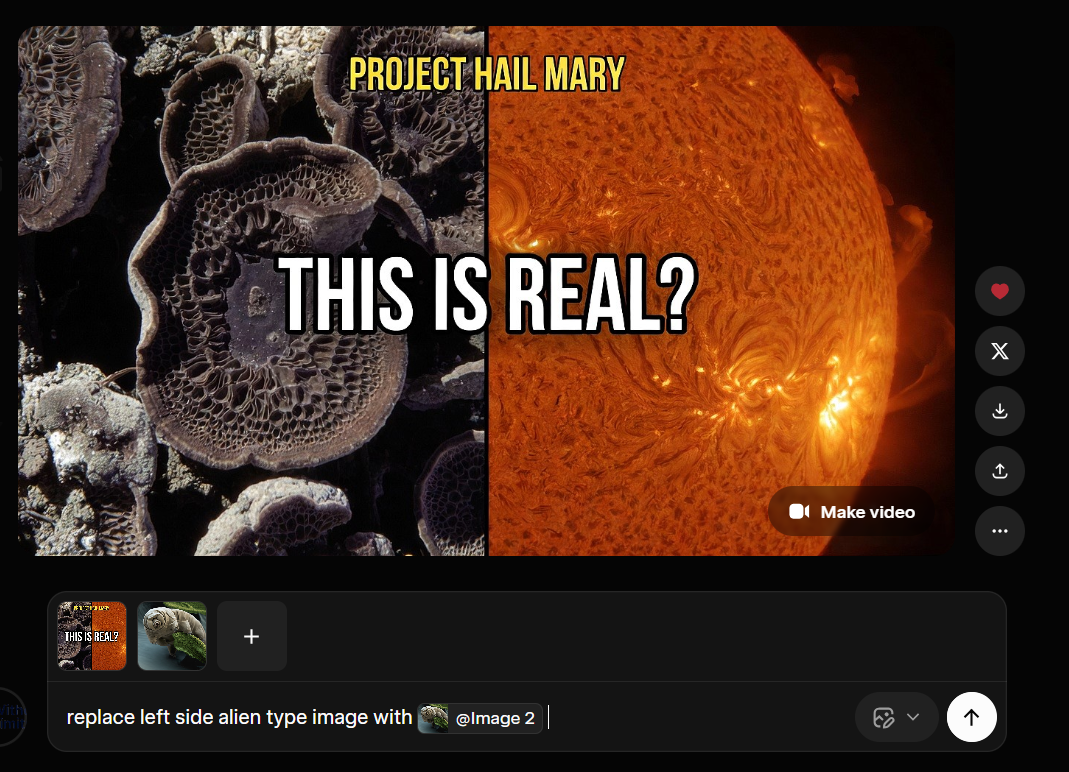
What I was trying to do: replace the left side element using a reference image via the @ feature. Source: Grok / xAI

What came back: the model changed the right side. Source: Grok / xAI
The prompt was explicit: replace the left side image with a different reference. Grok Imagine changed the right side. This is not a subtle misread. Left and right are not ambiguous words. The model that can hold seven visual references in memory simultaneously, maintain lighting consistency across a composite frame, and understand the emotional register of a 3am scrolling prompt cannot reliably execute “change the left part, not the right.” The instruction-following breaks specifically on spatial directionality, and it breaks consistently enough that you cannot trust it when precision matters.
The gap this exposes is real. Grok Imagine is increasingly capable as a generative tool and increasingly unreliable as an editing tool. Generation from nothing, it handles. Modification of something specific, in a specific location, following a specific instruction. That is where it falls apart. For thumbnail work where iteration is everything and you need to change one element without touching the rest, this is not a minor limitation.
The $30 Question
SuperGrok costs $30 per month globally, or ₹700 per month in India. It is not primarily an image and video generator. It is a full AI subscription: Grok 4.1 chat, DeepSearch, extended context, document analysis, with Imagine 1.0 for image and video generation included. Evaluating it against Midjourney’s $10 basic plan or Runway’s per-credit model is a comparison that doesn’t work cleanly in either direction.
The “unlimited” image generation has soft caps that xAI does not document publicly. Users hitting 50 to 100 rapid generations in succession report throttling. Reset times are inconsistent: sometimes a two-hour rolling window, sometimes a 24-hour reset, and the algorithm that decides which you get is not explained anywhere in the interface. The February 2026 update introduced 720p resolution alongside the existing 480p option, with the 10-second clip length. Higher quality outputs consume quota significantly faster. Users who previously generated 40 to 60 videos per day report hitting limits after roughly 10 to 15 videos at 720p. That is not unlimited in any meaningful sense.
For someone testing it across social media content work, the bundle earns its cost if you use Grok 4.1 chat alongside the image generation. The two together make the subscription defensible. But if you are coming to SuperGrok specifically for image and video generation and the chat component doesn’t matter to you, the math gets harder. Midjourney at $30 per month gives you more aesthetic control for pure image work. Runway gives you better video for dedicated clip production. Grok Imagine is the right choice when you want both things in one place and you are already in the X ecosystem, not when you are comparing tools in isolation.
The broader video generation field in 2026 gives Grok Imagine real competition. Kling 3.0 from Kuaishou is widely regarded as the best cost-to-quality ratio for short-form social content, with smooth human motion that holds up at scale. Sora 2 from OpenAI is the benchmark for physics simulation: water, fire, gravity, complex object interactions, the things Grok Imagine gets wrong. Seedance from ByteDance takes a different approach entirely, accepting images, video, and audio as reference inputs simultaneously, which gives creators a level of compositional control no other tool currently matches. Each solves a different problem. Grok Imagine’s edge is speed, native audio, and price. At $0.05 per second of video via API, it undercuts most of the field significantly. A full comparison of all four is something I plan to do separately, with actual side-by-side outputs.
The question that stays with me after a month of this is not whether Grok Imagine will get better at hands or physics. It will. The more interesting question is what a model that genuinely understood physical causality would change about what a content creator can make. Right now, every image generator gives you a world that looks real. None of them can yet give you a world that behaves real. Grok Imagine is closer than most to the first thing. The second thing is still ahead, and when it arrives, what becomes possible for someone building videos from a laptop in the middle of the night will be something else entirely.
The false confidence problem is not unique to image generation either. It runs deeper through how these models present their outputs, a pattern Hannah Fry put her finger on recently in a way that is worth reading alongside this. And when the side-by-side comparison of Grok Imagine, Kling, Sora, and Seedance is ready, it will be on the blog.
Free PDF + Weekly Newsletter
📄 Free PDF on subscribe — 8 AI Tools I Actually Use in 2026. Honest verdicts, no sponsored picks.
📬 Every Tuesday — new AI research, tool updates, and what it actually means for people who use these tools for real work. Written by a data scientist, not a tech blogger.
Subscribe Free