
n8n Is Not a No-Code Tool.
It Just Looks Like One.
A practical review from someone who builds agentic AI systems for work and used n8n to automate something for fun. It did not go smoothly. That’s the point.
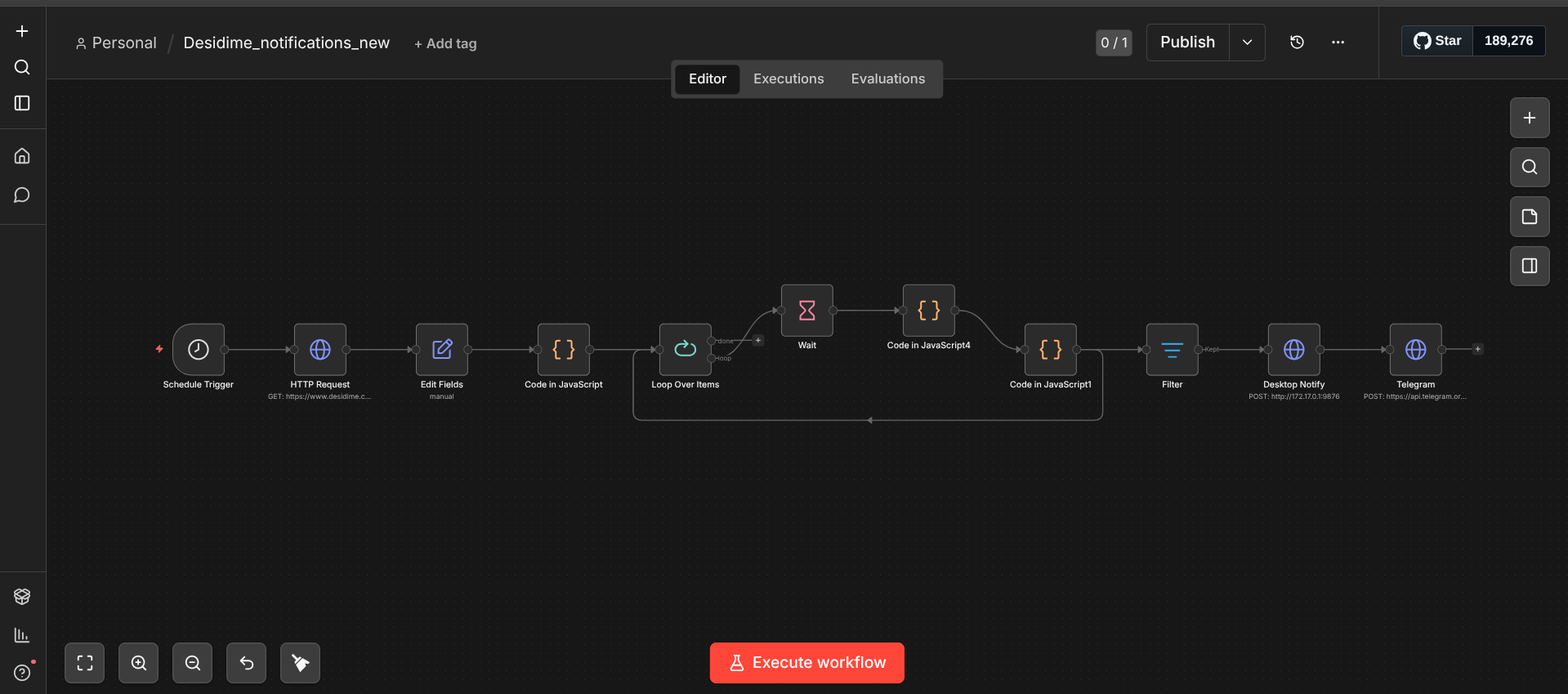
n8n automation looks simple from the outside. You connect nodes on a canvas, set a trigger, and something runs. That description is accurate and also completely useless for understanding whether it’s worth your time. I built a deal alert workflow on it, it broke twice, and I learned more from that than from any tutorial. Here’s the honest account. working on agentic AI systems. Multi-agent pipelines, LLM tool use, autonomous decision-making. I’m not a DevOps person. I don’t enjoy managing servers. So when I decided to automate something I care about, catching good deals before they expire, I expected n8n to either work or frustrate me into giving up.
What n8n Actually Is
n8n is a workflow automation platform. You connect services with nodes on a visual canvas, trigger on a schedule or event, and something runs. That description sounds like Zapier. The difference is that n8n runs on your own server. You point Docker at a domain, own everything, pay nothing per execution. That’s why it has 188,000 GitHub stars. It ships with 500+ integrations and 70 LangChain-based AI nodes covering agents, vector stores, memory, and every major LLM. The AI layer has been native since 2024, not added later.
The Code node is what makes n8n worth learning. You can write JavaScript or Python directly inside a workflow step. That single feature eliminates an entire category of workarounds that plague Zapier and Make users. When I needed to parse deal HTML using regex, deduplicate using workflow static data, and return structured objects for the next step, I wrote twenty lines of JavaScript and it worked. For someone who builds agentic systems professionally, this felt natural. It’s the same instinct of keeping logic close to where the data flows.
The Code node is what makes n8n worth learning. You can write JavaScript or Python directly inside a workflow step. That single feature eliminates an entire category of workarounds that plague Zapier and Make users. When I needed to parse deal HTML using regex, deduplicate using workflow static data, and return structured objects for the next step, I wrote twenty lines of JavaScript and it worked. For someone who builds agentic systems professionally, this felt natural. It’s the same instinct of keeping logic close to where the data flows.
n8n counts executions per workflow run, not per step. A ten-node workflow that triggers 1,000 times uses 1,000 executions. The same workflow in Zapier would consume 10,000 tasks. At scale and complexity this is a 3x to 20x cost difference. It’s the core reason technical teams switch from Zapier once their workflows get complicated.
The Deal Alert Build
The workflow I built does one thing: watch a set of deal pages, detect new listings under a price threshold, and send me a Telegram message before the window closes. Two hours to build. Longer to trust.
The trigger is a Schedule node running every 30 minutes. That kicks off an HTTP Request node fetching the deal page HTML. The response goes into a Code node where I parse the HTML with regex, extract the deal title, price, and URL, and check against a static dedupe store built into the workflow itself. n8n has a key-value store scoped to each workflow. No external database needed for deduplication. Zapier doesn’t have this. Make doesn’t have this.
The parsed result hits an IF node. If the price is under threshold and the deal hasn’t been seen before, it goes to a Telegram node that fires the message. If not, the execution ends there. The whole thing took about two hours to build, 45 minutes of which was fighting the HTML parsing because the site structure changed between the time I tested and the time I deployed.
“The visual canvas is useful for seeing the shape of a workflow. The moment anything goes wrong, you’re in execution logs reading JSON. That’s not a complaint. It’s just what n8n is.”
The execution history is the part I didn’t see coming. Every run logs the input and output at each node. When my regex broke on a site structure change, I replayed the failed execution with the original payload and debugged the Code node in isolation. Coming from print-statement debugging in Python, that felt like an actual upgrade.
How to Deploy n8n
The fastest way to start. One Docker command and you have n8n running at localhost:5678. No domain, no SSL, no persistence unless you mount a volume. Good for building and testing. Useless for any workflow that needs to receive webhooks from external services, because nothing outside your machine can reach it.
The technical default. Rent a Hetzner or DigitalOcean VPS, install Docker, run n8n with Docker Compose behind an Nginx reverse proxy with Certbot SSL. Full control, unlimited executions, your data stays yours. You are also now the sysadmin. Updates, backups, SSL renewal: all yours. Worth it if you run 10+ workflows regularly.
Middle ground. Install Coolify on a $5-8 VPS and deploy n8n through its dashboard. Coolify handles SSL, deployments, and basic monitoring. You still own the server but get a GUI for managing it. Good option if Docker Compose feels like too much friction but you want more control than managed cloud.
Starter gives 2,500 executions and 7 days of execution history. Pro gives 10,000 executions and workflow version history. Zero ops, running in minutes. Annual billing saves 17%. The execution count sounds generous until you have workflows running every 30 minutes on 10 triggers. A single polling workflow checking every 10 minutes burns through 4,320 executions alone. Sub-workflows and failed runs both count against your quota.
If you want to build AI workflows without touching a server, n8n Cloud Starter at $24/month is the right starting point. Run it for a month, check your actual execution consumption, then decide if self-hosting is worth the time. For anyone who already runs Docker regularly and has a VPS for other things, Hetzner CX22 is the obvious choice. That’s $228 saved per year from one switch.
The hidden cost of self-hosting Running n8n in Docker is free. The actual cost is the 2-3 hours you’ll spend the first time something breaks at a bad moment. SSL certificate expired. Docker container crashed silently. Volume not persisted after a restart. These are all solvable. They just require someone to solve them. Budget time, not just money.
The AI Integration Layer
The part that actually matters for AI builders is the 70+ LangChain nodes. The AI Agent node runs a tool-use loop where any other n8n node can be a tool. You give the agent a system prompt and a set of tools, and it decides which ones to call and in what order. If your workflow logic is deterministic, you don’t need it. If you want the LLM to decide which action to take next based on context, it’s the right tool.
Vector store integration is native. Pinecone, Qdrant, Weaviate, and Supabase pgvector all have dedicated nodes. The retrieval-augmented generation pattern (embed a document, store it, retrieve relevant chunks at query time, pass to LLM) takes about 15 minutes to wire up from scratch. That same pipeline in code takes considerably longer to make reliable.
Claude (including Sonnet 4.6), OpenAI, and Gemini are all supported natively. So is Groq for speed-sensitive use cases. The LLM nodes handle authentication, retry logic, and response parsing. You pass in a prompt, get back structured output, and the workflow continues. In practice, every LLM connection I tested worked without needing to touch the underlying API.
n8n is still fundamentally an IF/THEN platform. You, the builder, author the logic. The platform executes it literally. The AI Agent node gives you a reasoning loop inside a workflow, but the workflow structure itself is still deterministic. If what you actually need is an agent that reads context and decides its own next step from scratch, n8n will eventually feel constraining. For most practical automation tasks, that ceiling is far away.
What Actually Breaks
Webhook-dependent workflows need a publicly accessible URL. That means local development is immediately awkward. You need ngrok or a similar tunnel just to test a webhook trigger, which adds friction. On Cloud this isn’t an issue. On a VPS it’s handled by your domain setup. Locally it’s annoying every single time.
Error handling is your responsibility. n8n has error output connectors on most nodes, but wiring them up to do something useful (retry with backoff, send an alert, log to a database) requires you to design that. The defaults are silent failures in the execution log. For a workflow you check daily, that’s fine. For something business-critical running unattended, you need to build the error handling explicitly.
The community edition has no SSO, no RBAC, no audit logs, and forum-only support. If you’re the only person touching the instance, it doesn’t matter. Once two people need to share credentials and set different permission levels, you hit a wall. The Business plan at $800/month adds RBAC and SSO, but that’s a brutal price jump from zero.
If you’re self-hosting, keep n8n updated. In early 2026, two CVSS 10.0 remote code execution vulnerabilities were discovered in n8n instances, both unauthenticated attack vectors. Both were patched in version 1.121.0. Because n8n stores API credentials and connects to internal systems, an unpatched self-hosted instance is a serious exposure. Run the latest version.
Version history only exists on Pro cloud and above. Below that you get 7 days of execution logs. If you break a working workflow and want to roll back, on the Starter plan you’re doing it from memory or from a manually exported JSON backup. Search ‘n8n workflow rollback’ on the community forum and you’ll see how often this comes up.
The first workflow takes longer than you expect. The second doesn’t. By the fifth you stop thinking about nodes and start thinking about the problem. That’s when it’s actually useful.
If you build ML pipelines in Python and are wondering whether n8n fits or competes with that work: it fits. n8n handles the plumbing between services. Your Python handles the logic that doesn’t belong in a visual canvas. The Code node is the bridge. I built a useful workflow in an afternoon, it broke twice, I fixed both, and the deal alerts have fired every morning since. That’s the only test that matters.